4. Multi-scale slide analysis
This tutorial combines ALHENA outputs at tile and cell scales and relates them through their shared spatial context.
This tutorial teaches
- Task: analyze one H&E slide across tile and cell scales
- Required inputs:
TileEmbeddings,CellEmbeddings, andAnnotationResultfrom the same slide- Outputs of the analysis: tile embedding clusters, cell embedding clusters, cell types, spatial neighborhoods, and cross-scale summaries
- Example used here: the results produced in Tutorials 1 to 3
- Key concept: the distinction between embedding space and physical space
X_alhena_tile               →  tile embedding clusters
X_alhena_backbone           →  cell embedding clusters
X_alhena_cell               →  shared cell space used for annotation
alhena_celltype_lineage_v1  →  reference-based cell types
spatial coordinates         →  physical neighborhoods and cross-scale analysis
The examples use Scanpy and Squidpy (pip install scanpy "squidpy>=1.8.2" igraph). Part F
additionally uses SpatialData, installed with the spatial extra, and spatialdata-plot
(pip install "alhena[spatial]" spatialdata-plot).
See Downstream analysis for the underlying concepts.
Example figures and outputs. The figures and outputs shown in this tutorial use a 2.3 mm region from the 10x Genomics FFPE Human Breast with Custom Add-on Panel dataset. They illustrate the workflow only; cluster structure and biological interpretation will differ between slides.
Source: FFPE Human Breast with Custom Add-on Panel, 10x Genomics, CC BY 4.0. The image is cropped, downsampled and overlaid with ALHENA results.
from pathlib import Path

import matplotlib.pyplot as plt
import numpy as np
import pandas as pd
import scanpy as sc
import squidpy as sq

import alhena
from alhena import io, viz

# The folder where Tutorials 1 to 3 saved their results.
OUT = Path("alhena_out")

# The slide and the nuclei of Tutorial 2, to show the tissue under the results.
SLIDE = Path("slide.ome.tif")
NUCLEI = Path("nuclei.geojson")

# Part F looks closely at one square of the slide: x0, y0 and its side, in the slide's
# full-resolution pixels. The example square; None takes a square at the center of the tiles.
WINDOW = (36400, 43100, 2000)

print(alhena.__version__)
0.1.0
Load the three ALHENA results
The analysis starts from:
TileEmbeddingsfrom Tutorial 1;CellEmbeddingsfrom Tutorial 2;- the
AnnotationResultsaved in Tutorial 3, read back with the cells it was made from.
The saved files are used only to avoid recomputing the image embeddings and the annotations. The same analysis can be performed directly on in-memory results.
Tip: encode both scales in one pass. Tutorials 1 and 2 run the slide through the model twice. When a slide needs both tile and cell embeddings, encode them together instead. Each tile then runs through the model once, and the tile embeddings are those
encode_tiles()returns:cells = encoder.encode_cells(source, nuclei, all_tiles=True) tiles = cells.tiles
tiles = io.read_tile_embeddings(OUT / "tiles.h5ad")
result = io.read_annotations(OUT / "annotations.h5ad", name="lineage_v1")
cells = result.cells

print(len(tiles), "tiles |", len(cells), "cells |", int(result.valid.sum()), "annotated")
print("tiles are placed in:", tiles.bounds_frame)
print("cells are placed in:", cells.centroids_frame)
576 tiles | 36804 cells | 36804 annotated
tiles are placed in: slide.ome.tif, level 0
cells are placed in: slide.ome.tif, level 0
The tile and cell results use the same slide coordinate system, so their spatial positions can be compared directly.
For downstream analysis, convert the outputs to AnnData. tile_table contains one observation per
tile, while cell_table contains one observation per cell with a valid embedding.
The columns of an annotation are named after its axis. The cells were annotated on the default
axis, lineage_v1, so their cell types are in alhena_celltype_lineage_v1, which CELL_TYPE
names below. The table also stores the color of each cell type, so Scanpy and Squidpy draw the
cell types in ALHENA's palette.
tile_table = tiles.to_anndata()
cell_table = result.to_anndata()
cell_table = cell_table[cell_table.obs["alhena_embedding_valid"]].copy()
CELL_TYPE = "alhena_celltype_lineage_v1"
Display the H&E beneath the results
For visualization, io.read_region() reads the part of the H&E image covered by the encoded tiles
at a lower resolution. The returned extent keeps the image registered with the full-resolution
slide coordinates used by the tile and cell results.
he, extent = io.read_region(SLIDE, window=tiles.bounds, downsample=8)
Part A: tile embedding clusters
Build a neighbor graph from X_alhena_tile, visualize the representation with UMAP, and cluster the
tile embeddings with Leiden. The resulting groups are tile embedding clusters: unsupervised
groups in ALHENA's pre-projection tile representation. They are not predefined tissue classes.
The Leiden resolution parameter controls clustering granularity.
sc.pp.neighbors(tile_table, use_rep="X_alhena_tile")
sc.tl.umap(tile_table)
sc.tl.leiden(
    tile_table,
    key_added="tile_cluster",
    resolution=0.5,
    flavor="igraph",
    n_iterations=2,
)
Tile embedding clusters on the slide
The spatial bounds of each tile allow clusters identified in embedding space to be mapped back onto
the H&E image. viz.tile_regions() draws each tile region in the color Scanpy gave its cluster,
read from the table of tiles.
figure, axes = plt.subplots(1, 2, figsize=(13, 5.5))
sc.pl.umap(tile_table, color="tile_cluster", palette="Dark2", ax=axes[0], show=False,
           title="tile clusters, in embedding space")
viz.tile_regions(tile_table, "tile_cluster", ax=axes[1], image=he, extent=extent, legend=False,
                 title="tile clusters, on the slide")
figure.tight_layout()
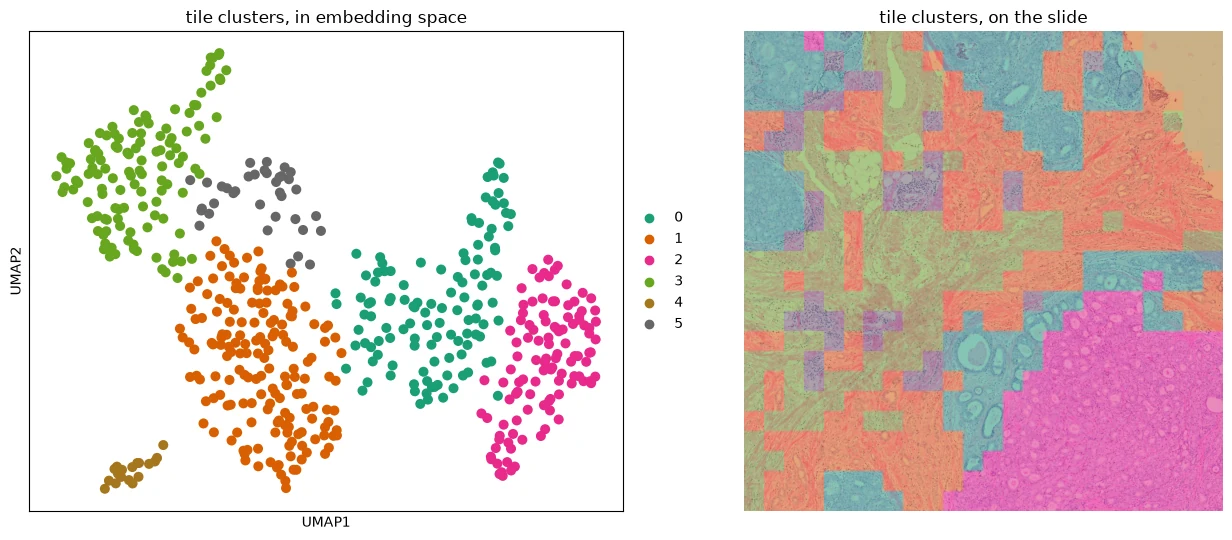
Left: tile embeddings in UMAP space, colored by tile embedding cluster. Right: the same clusters mapped onto the H&E image.
Tile embedding clusters do not come with biological labels. Interpret them by examining representative H&E regions and their spatial distribution.
In this example, one cluster contains mostly background regions, illustrating that ALHENA encodes the image regions supplied to it rather than performing tissue detection.
Inspect representative tiles from each cluster
clusters = tile_table.obs["tile_cluster"].cat.categories
rng = np.random.default_rng(0)

figure, axes = plt.subplots(len(clusters), 4, figsize=(7, 1.9 * len(clusters)))
for row, cluster in zip(axes, clusters):
    members = np.flatnonzero(tile_table.obs["tile_cluster"] == cluster)
    for axis, index in zip(row, rng.choice(members, size=min(4, len(members)), replace=False)):
        image, _ = io.read_region(SLIDE, window=tiles.bounds[index], downsample=4)
        axis.imshow(image)
    for axis in row:
        axis.set_axis_off()
    row[0].set_title(f"tile cluster {cluster}", loc="left", fontsize=10)
figure.tight_layout()
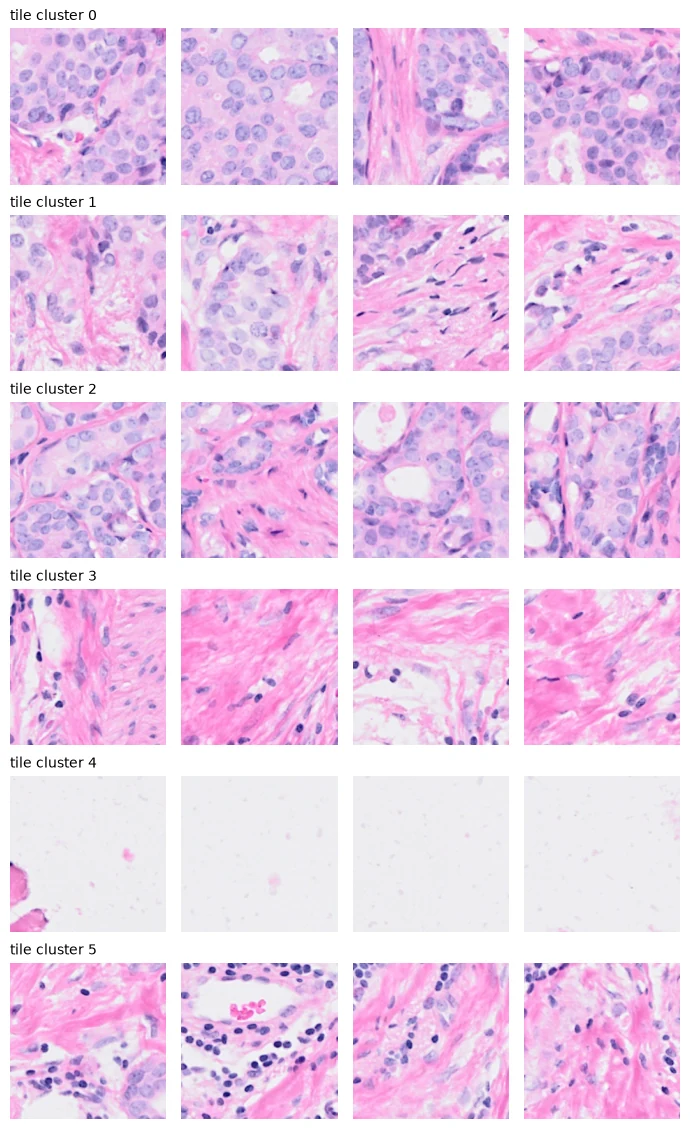
Four representative tiles sampled from each tile embedding cluster.
Part B: cell embedding clusters
Apply the same unsupervised analysis to X_alhena_backbone, ALHENA's pre-projection cell
representation.
The resulting cell embedding clusters describe structure in the image-derived representation. They are not biological cell-state labels and do not depend on the single-cell reference used for annotation.
sc.pp.neighbors(cell_table, use_rep="X_alhena_backbone")
sc.tl.umap(cell_table)
sc.tl.leiden(
    cell_table,
    key_added="cell_cluster",
    resolution=0.3,
    flavor="igraph",
    n_iterations=2,
)
Cell clusters in embedding and physical space
A cell's pre-projection embedding is obtained from image tokens pooled over its nucleus. Because those image tokens were computed within a surrounding tile, cells from the same tile share some contextual information.
Map cell embedding clusters back to the slide before interpreting them. Strong alignment between cluster boundaries and tile boundaries may indicate an influence of shared tile context rather than purely cell-intrinsic variation.
The middle panel below colors the same pre-projection embedding space by the reference-based cell types from Tutorial 3.
figure, axes = plt.subplots(1, 3, figsize=(20, 5.8))
sc.pl.umap(cell_table, color="cell_cluster", ax=axes[0], show=False,
           title="cell clusters, in embedding space")
sc.pl.umap(cell_table, color=CELL_TYPE, ax=axes[1], show=False,
           title="cell types, in the same space")
sc.pl.embedding(cell_table, basis="spatial", color="cell_cluster", ax=axes[2], show=False, size=4,
                legend_loc=None, title="cell clusters, on the slide")
for x0, y0, x1, y1 in tiles.bounds:
    axes[2].add_patch(plt.Rectangle((x0, y0), x1 - x0, y1 - y0, fill=False, linewidth=0.15,
                                    color="0.8"))
axes[2].invert_yaxis()          # image rows run downward
axes[2].set_aspect("equal")
axes[2].set_axis_off()
figure.tight_layout()
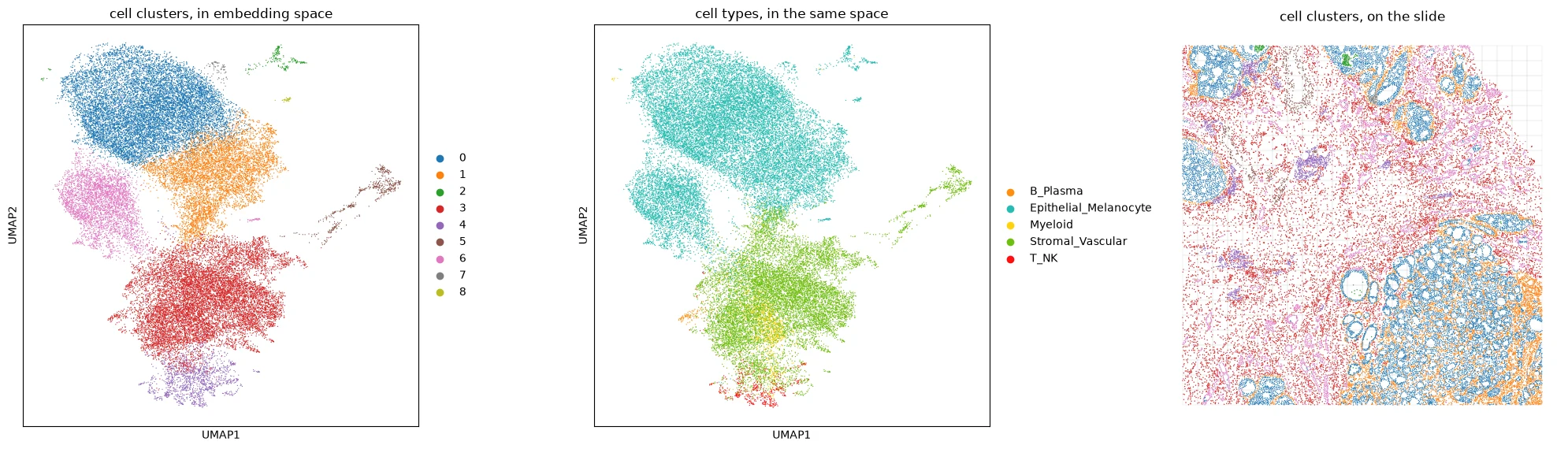
Left: cells in the UMAP of X_alhena_backbone, colored by cell embedding cluster. Middle: the same representation colored by reference-derived cell type. Right: cell embedding clusters mapped onto the slide, with tile boundaries shown in gray.
Part C: shared cell space and cell types
X_alhena_cell is obtained by projecting the pre-projection cell embedding through
img_tok_proj. This projected representation is the shared space in which image-derived cells are
compared with the single-cell reference.
X_alhena_backbone
        ↓ img_tok_proj
X_alhena_cell
        ↓ reference retrieval
cell-type annotation
Visualizing X_alhena_cell therefore answers a different question from visualizing
X_alhena_backbone: it shows the representation specifically optimized for reference-based
annotation.
Cell embedding clusters and cell types can then be compared as complementary descriptions of the same cells. Clusters are obtained unsupervised from the pre-projection image representation, while cell types are assigned by retrieval after projection into the shared cell space.
sc.pp.neighbors(cell_table, use_rep="X_alhena_cell", key_added="cell_space")
sc.tl.umap(cell_table, neighbors_key="cell_space", key_added="X_umap_cell_space")

clusters_by_type = pd.crosstab(
    cell_table.obs["cell_cluster"], cell_table.obs[CELL_TYPE], normalize="index"
)

figure, axes = plt.subplots(1, 2, figsize=(14, 5.5))
sc.pl.embedding(cell_table, basis="X_umap_cell_space", color=CELL_TYPE, ax=axes[0],
                show=False, title="cell types, in the shared cell space")
axes[0].set(xlabel="UMAP1", ylabel="UMAP2")
clusters_by_type.plot.barh(stacked=True, width=0.8, legend=False, ax=axes[1],
                           color=viz.class_palette(clusters_by_type.columns))
axes[1].invert_yaxis()
axes[1].set_xlabel("fraction of cells in each cell cluster")
axes[1].set_ylabel("cell cluster")
axes[1].set_title("cell types within each cell cluster")
figure.tight_layout()
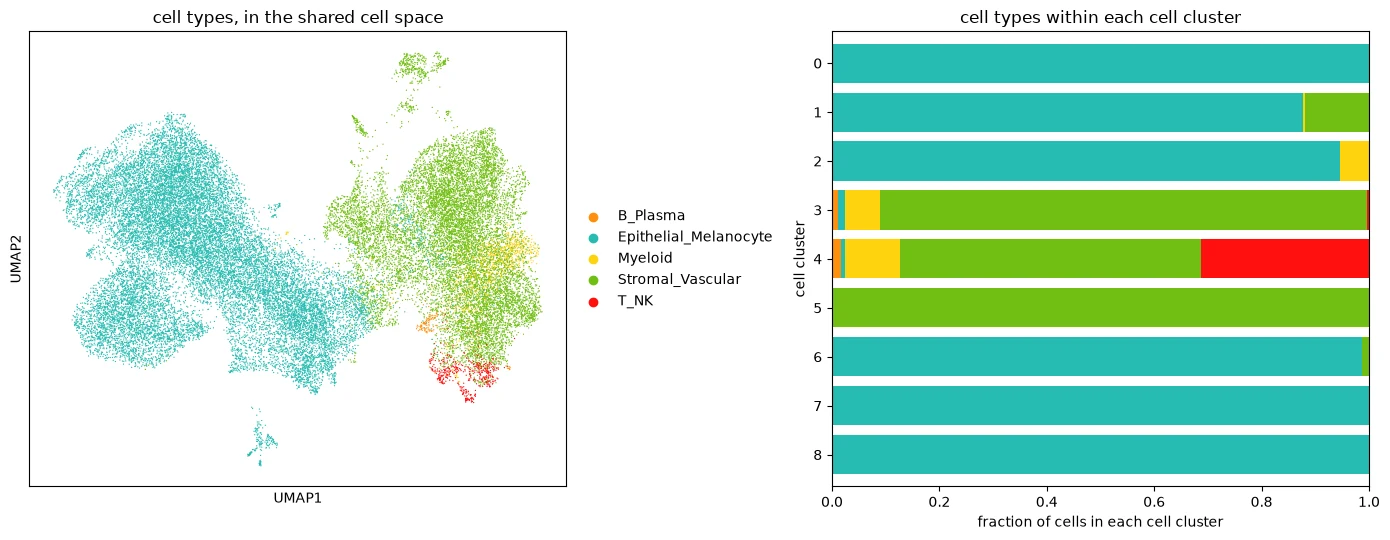
Left: cells in the UMAP of X_alhena_cell, colored by predicted cell type. Right: the cell-type composition of each cell embedding cluster.
The relationship between cell clusters and predicted cell types can be inspected for the dataset being analyzed, but neither is expected to reproduce the other exactly.
Part D: cell types in physical space
The previous analyses operated in embedding spaces. This section instead uses the physical positions of the cells to study how predicted cell types are arranged on the slide.
The example below creates a Delaunay spatial-neighbor graph and retains edges up to 30 µm. Squidpy then evaluates neighborhood enrichment between the predicted cell types.
called = cell_table[cell_table.obs["alhena_valid_lineage_v1"]].copy()
mpp = called.uns["alhena_cells"]["centroids_mpp"]

sq.gr.spatial_neighbors_delaunay(called, radius=(0, 30 / mpp))
sq.gr.nhood_enrichment(called, cluster_key=CELL_TYPE, seed=0, show_progress_bar=False)

limit = np.abs(called.uns[f"{CELL_TYPE}_nhood_enrichment"]["zscore"]).max()

figure, axes = plt.subplots(1, 2, figsize=(16, 6), gridspec_kw={"width_ratios": [1.3, 1]})
sc.pl.embedding(called, basis="spatial", color=CELL_TYPE, ax=axes[0], show=False, size=3,
                title="cell types, on the slide")
axes[0].invert_yaxis()
axes[0].set_aspect("equal")
axes[0].set_axis_off()
sq.pl.nhood_enrichment(called, cluster_key=CELL_TYPE, mode="zscore", ax=axes[1],
                       cmap="coolwarm", vmin=-limit, vmax=limit,
                       title="neighborhood enrichment, z-score")
figure.tight_layout()
figure.subplots_adjust(wspace=0.7)  # room between the legend and the labels of the heatmap
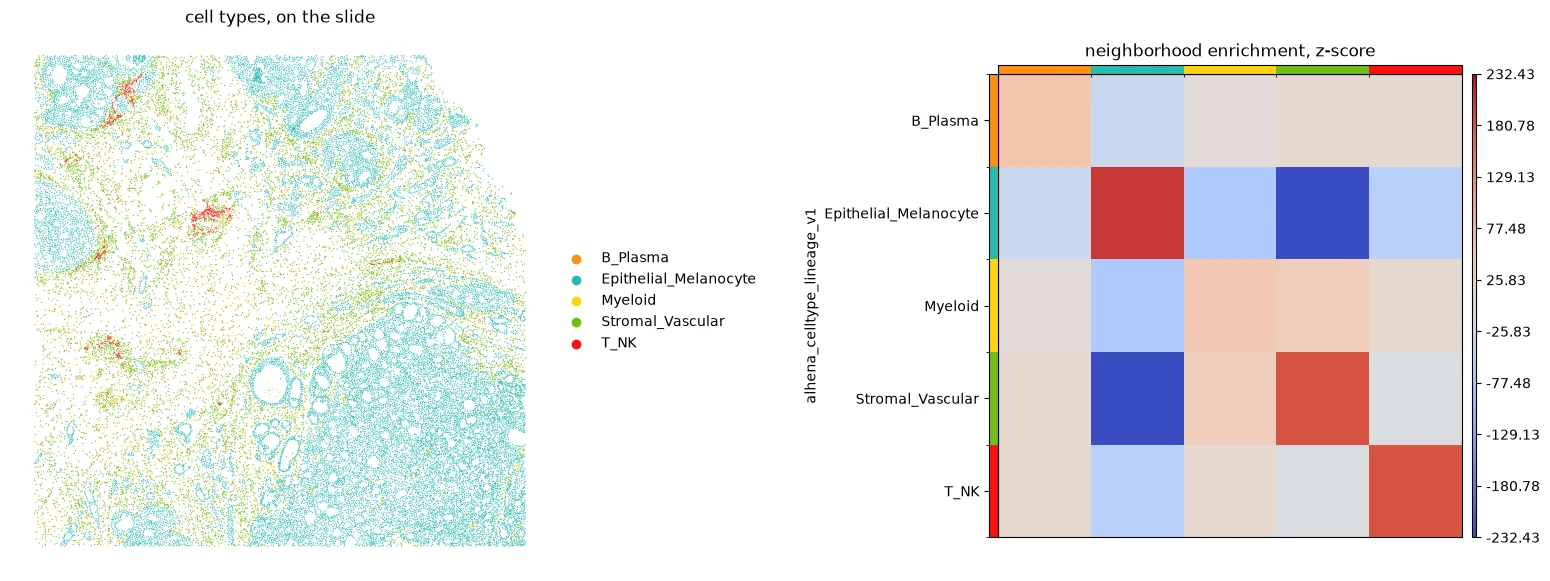
Left: the cell types on the slide. Right: neighborhood enrichment between cell types; a high z-score marks two types that are neighbors more often than chance.
Co-occurrence provides a complementary distance-dependent view of spatial organization. The example below evaluates cell-type co-occurrence from 10 to 200 µm.
called.obsm["spatial_um"] = called.obsm["spatial"] * mpp
sq.gr.co_occurrence(
    called, cluster_key=CELL_TYPE, spatial_key="spatial_um", interval=np.linspace(10, 200, 20)
)
sq.pl.co_occurrence(called, cluster_key=CELL_TYPE, clusters="Epithelial_Melanocyte", figsize=(7, 4))
axis = plt.gca()
axis.axhline(1, color="0.6", linewidth=0.8, linestyle="--")
axis.set(title="co-occurrence with cells predicted as Epithelial_Melanocyte",
         xlabel="distance (µm)", ylabel="co-occurrence ratio")
plt.show()
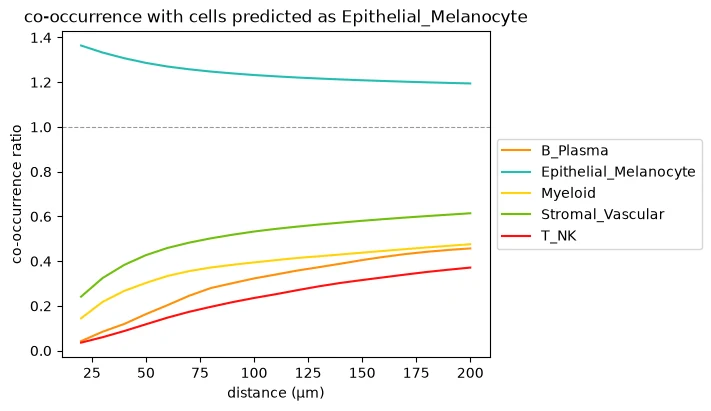
Co-occurrence with cells predicted as Epithelial_Melanocyte at distances up to 200 µm. Ratios above 1 indicate enrichment relative to the overall frequency of the corresponding predicted class.
Part E: relate tile and cell scales
tiles.locate() names the tile whose region holds each cell, from the positions of the cells and
the spatial bounds of the tiles. The tile table is indexed by the same names, so the cluster of each
tile reaches the cells it holds.
This works whether the tiles and the cells were encoded in one pass or in two, over the same region or not, as long as their positions are in the same coordinate frame.
cluster_of_tile = tile_table.obs["tile_cluster"]
for table in (cell_table, called):
    table.obs["tile_cluster"] = cluster_of_tile.reindex(tiles.locate(table)).to_numpy()

placed = cell_table.obs["tile_cluster"].notna()
print(f"{placed.sum():,} of {len(placed):,} cells lie in a tile region")
36,792 of 36,804 cells lie in a tile region
Optional quality control: identify non-tissue tile clusters
A tile embedding cluster may correspond mainly to background if background tiles were included in the input. Cell density can help identify clusters worth inspecting, but it should not be used as an automatic tissue classifier.
Review representative H&E tiles before excluding any cluster from downstream summaries.
density = pd.DataFrame({
    "tiles": tile_table.obs["tile_cluster"].value_counts(),
    "cells": cell_table.obs["tile_cluster"].value_counts(),
}).reindex(tile_table.obs["tile_cluster"].cat.categories).fillna(0).astype(int)
density["cells per tile"] = (density["cells"] / density["tiles"]).round(1)
density
| tiles | cells | cells per tile | |
|---|---|---|---|
| 0 | 118 | 9654 | 81.8 |
| 1 | 172 | 9474 | 55.1 |
| 2 | 109 | 11264 | 103.3 |
| 3 | 123 | 3671 | 29.8 |
| 4 | 18 | 6 | 0.3 |
| 5 | 36 | 2723 | 75.6 |
Low cell density is only a reason to inspect a cluster. Genuine tissue regions can also contain few cells.
In the example shown here, visual inspection identifies cluster 4 as background, so it is excluded from the composition summaries below while remaining visible in spatial maps.
# Tile clusters confirmed by visual inspection to contain no tissue: cluster 4 in the example.
# Set this from your own inspection. Leave empty if all clusters represent tissue.
NON_TISSUE = ["4"]

tissue_cells = cell_table[~cell_table.obs["tile_cluster"].isin(NON_TISSUE)]
tissue_called = called[~called.obs["tile_cluster"].isin(NON_TISSUE)]
Tile clusters and cell types
Summarize the distribution of predicted cell types within each tile embedding cluster:
by_type = pd.crosstab(
    tissue_called.obs["tile_cluster"], tissue_called.obs[CELL_TYPE], normalize="index"
)
Tile clusters and cell clusters
The same comparison can relate regional tile-level structure to unsupervised structure in the pre-projection cell representation.
These two levels are not fully independent because each cell embedding is pooled from image tokens computed within a surrounding tile.
by_cluster = pd.crosstab(
    tissue_cells.obs["tile_cluster"], tissue_cells.obs["cell_cluster"], normalize="index"
)
Compare the cross-scale summaries
The two composition plots use different denominators. The middle plot shows cell-type fractions among the annotated cells of each tile cluster. Cells without a valid prediction are left out of this plot. The right plot shows cell-cluster fractions among all cells with a valid embedding, including cells without a valid prediction. The number under each tile cluster is the denominator of its bar. The two plots show the same numbers when every cell with a valid embedding received a prediction.
colors = dict(
    zip(tile_table.obs["tile_cluster"].cat.categories, tile_table.uns["tile_cluster_colors"])
)
cluster_colors = dict(
    zip(cell_table.obs["cell_cluster"].cat.categories, cell_table.uns["cell_cluster_colors"])
)

figure, axes = plt.subplots(1, 3, figsize=(20, 5.8), gridspec_kw={"width_ratios": [1, 1.15, 1.15]})
viz.tile_regions(tile_table, "tile_cluster", ax=axes[0], image=he, extent=extent, legend=False,
                 title="tile clusters, on the slide")
axes[0].legend([plt.Rectangle((0, 0), 1, 1, color=color, alpha=0.5) for color in colors.values()],
               [f"{cluster}, not tissue" if cluster in NON_TISSUE else cluster for cluster in colors],
               title="tile cluster", loc="upper left", bbox_to_anchor=(1.01, 1), frameon=False)

by_type.plot.bar(stacked=True, width=0.8, rot=0, ax=axes[1],
                 color=viz.class_palette(by_type.columns))
axes[1].set_title("cell types in each tile cluster")
by_cluster.plot.bar(stacked=True, width=0.8, rot=0, ax=axes[2],
                    color=[cluster_colors[cluster] for cluster in by_cluster.columns])
axes[2].set_title("cell clusters in each tile cluster")
for axis, table, counted, denominator, legend in (
    (axes[1], by_type, tissue_called, "annotated cells", "cell type"),
    (axes[2], by_cluster, tissue_cells, "cells with valid embeddings", "cell cluster"),
):
    counts = counted.obs["tile_cluster"].value_counts()
    axis.set_xticks(range(len(table)),
                    [f"{cluster}\n{counts[cluster]:,}" for cluster in table.index])
    axis.set_xlabel(f"tile cluster and number of {denominator}")
    axis.set_ylabel(f"fraction of {denominator}")
    axis.legend(title=legend, bbox_to_anchor=(1.01, 1), loc="upper left", fontsize=8, frameon=False)
figure.tight_layout()
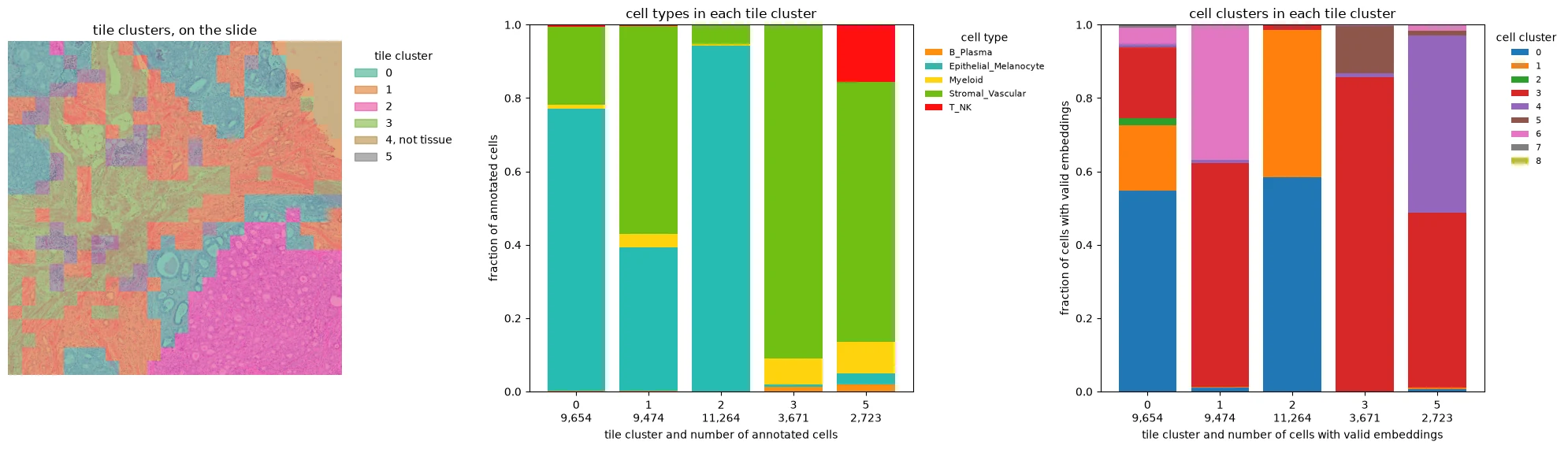
Left: tile embedding clusters mapped onto the H&E. Middle: predicted cell types within each tile cluster. Right: cell embedding clusters within each tile cluster. The visually identified background cluster remains on the map but is excluded from the composition summaries.
These summaries relate regional image-derived structure to cellular composition and cellular embedding structure. Their biological interpretation depends on the slide and analysis question.
Cell-type neighborhoods within tile clusters
The spatial graph from Part D can also be summarized within each tile cluster. The example below asks which cell types occur around epithelial cells in different tile-level regions.
graph = called.obsp["spatial_connectivities"]
onehot = pd.get_dummies(called.obs[CELL_TYPE]).astype(float)
around = graph @ onehot.to_numpy()
around = pd.DataFrame(
    around / np.maximum(around.sum(axis=1, keepdims=True), 1),
    index=called.obs_names, columns=onehot.columns,
)

epithelial = (called.obs[CELL_TYPE] == "Epithelial_Melanocyte").to_numpy()
keep = epithelial & ~called.obs["tile_cluster"].isin(NON_TISSUE).to_numpy()
around[keep].groupby(called.obs["tile_cluster"][keep]).mean().round(2)
| B_Plasma | Epithelial_Melanocyte | Myeloid | Stromal_Vascular | T_NK | |
|---|---|---|---|---|---|
| tile_cluster | |||||
| 0 | 0.0 | 0.92 | 0.00 | 0.07 | 0.00 |
| 1 | 0.0 | 0.76 | 0.01 | 0.22 | 0.00 |
| 2 | 0.0 | 0.97 | 0.00 | 0.03 | 0.00 |
| 3 | 0.0 | 0.36 | 0.05 | 0.59 | 0.00 |
| 5 | 0.0 | 0.64 | 0.02 | 0.31 | 0.02 |
Differences between rows indicate that the local neighborhoods of epithelial cells vary across tile clusters. The appropriate statistical model for testing such differences depends on the biological question and study design.
Part F: keep the scales together in SpatialData
The previous analyses use several tables together with an independently loaded image. SpatialData can instead keep the H&E image, nuclei, tile regions, and ALHENA result tables in one registered object.
Two ALHENA functions add the tile- and cell-level results. The object must already contain the corresponding image and nuclei.
An existing SpatialData object can also be used as input: spatial.tile_source() exposes its image
as tiles, while spatial.cells_from_shapes() converts nucleus shapes into the membership
representation. The downstream encoding and annotation steps remain the same.
See An image in a SpatialData object and Nuclei in a SpatialData object for examples.
Build the example SpatialData object
If the image and the nuclei already live in a SpatialData object, this setup is unnecessary. The following cell only constructs a SpatialData object from the separate file-based inputs this tutorial starts from: the slide and the nucleus outlines.
Its coordinate system is the slide's full-resolution pixels, the frame the tiles and the nuclei are written in. The H&E is stored at the resolution read above, with a transformation that places it on those pixels. The nuclei need none.
# Build the example SpatialData object from the file-based inputs of this tutorial.
import geopandas as gpd
import spatialdata as sd
from spatialdata.models import Image2DModel, ShapesModel
from spatialdata.transformations import Identity, Scale, Sequence, Translation

left, right, bottom, top = extent
factor = (right - left) / he.shape[1]
on_slide = Sequence([Scale([factor, factor], axes=("x", "y")), Translation([left, top], axes=("x", "y"))])

nuclei = gpd.read_file(NUCLEI).set_index("cell_id")
sdata = sd.SpatialData(
    images={"he": Image2DModel.parse(he.transpose(2, 0, 1), dims=("c", "y", "x"),
                                     transformations={"global": on_slide})},
    shapes={"nuclei": ShapesModel.parse(nuclei, transformations={"global": Identity()})},
)
Add the ALHENA results
tiles_to_spatialdata() adds the tile regions and tile table. cells_to_spatialdata() adds the
cell table and associates its rows with the nuclei stored in region=. A later
cells_to_spatialdata() call with another annotation of the same cells, such as one on
compartment_v1, adds it to the same table.
from alhena import spatial

spatial.tiles_to_spatialdata(sdata, tiles)
spatial.cells_to_spatialdata(sdata, result, region="nuclei");
The embedding clusters were computed downstream rather than by ALHENA itself. Add these derived labels to the corresponding SpatialData tables, with the colors of the tile clusters:
stored_tiles = sdata.tables["alhena_tile_embeddings"]
stored_tiles.obs["tile_cluster"] = tile_table.obs["tile_cluster"].reindex(stored_tiles.obs.index)
stored_tiles.uns["tile_cluster_colors"] = tile_table.uns["tile_cluster_colors"]

cell_obs = sdata.tables["alhena_cells"].obs
for key in ("cell_cluster", "tile_cluster"):
    cell_obs[key] = cell_table.obs[key].reindex(cell_obs.index)
One SpatialData object now contains the registered image, nuclei, tile regions, and analysis tables:
SpatialData
├── images
│   └── he                        H&E image
├── shapes
│   ├── alhena_tiles              tile regions
│   └── nuclei                    nucleus outlines
└── tables
    ├── alhena_tile_embeddings    tile embeddings and tile clusters
    └── alhena_cells              cell embeddings, cell types, and cell clusters
Because the layers share coordinate transformations, a spatial query can crop the image, the nuclei and the tile regions together. spatialdata-plot then draws the cropped layers in the colors the tables store.
x0, y0, side = WINDOW or ((left + right) / 2 - 1000, (top + bottom) / 2 - 1000, 2000)
square = sd.bounding_box_query(
    sdata, axes=("x", "y"), min_coordinate=[x0, y0], max_coordinate=[x0 + side, y0 + side],
    target_coordinate_system="global", filter_table=False,
)

import spatialdata_plot  # gives SpatialData objects their .pl plotting methods

figure, axis = plt.subplots(figsize=(7, 7))
(
    square.pl.render_images("he")
    .pl.render_shapes("alhena_tiles", color="tile_cluster", table_name="alhena_tile_embeddings",
                      fill_alpha=0.25, outline_alpha=0.25, outline_color="black", outline_width=0.8)
    .pl.render_shapes("nuclei", color=CELL_TYPE, table_name="alhena_cells")
    .pl.show(ax=axis, title="one region of the slide across all layers")
)
axis.set_xlim(x0, x0 + side)
axis.set_ylim(y0 + side, y0)
axis.set_axis_off()
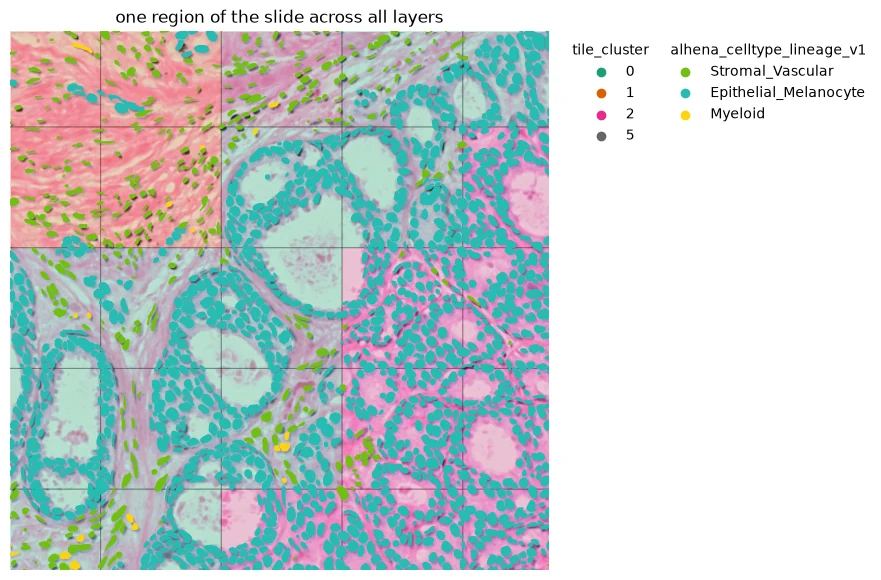
One spatial query showing the H&E image, tile regions colored by tile embedding cluster, and nucleus outlines colored by predicted cell type.
Save the complete object with sdata.write(path). See
Writing into a SpatialData object.
What this tutorial shows
one H&E slide
├── tile embedding clusters
├── cell embedding clusters
├── reference-based cell types
├── physical cell neighborhoods
└── cross-scale spatial analysis
Tile and cell clusters are unsupervised groups in ALHENA embedding spaces. Their biological interpretation should come from the underlying tissue and the analysis context rather than from the cluster identifiers themselves.
Next: 5. Custom reference